Hardware specifications
This page is the source of truth for joint counts, actuator specs, and bus
topology on Lite and Prime. The numbers here drive the joint limits in
humanoid_control_description_* and the per-joint stiffness/damping defaults in
humanoid_controllers/config/humanoid_control_*_controllers.yaml.
Lite humanoid
Bimanual upper body. 14 actuated DOFs by default
(7 per arm). The URDF kinematic chain always
includes the neck links so robot_state_publisher exposes the same tf
either way; the <ros2_control> neck block is added only in the
17-joint mode.
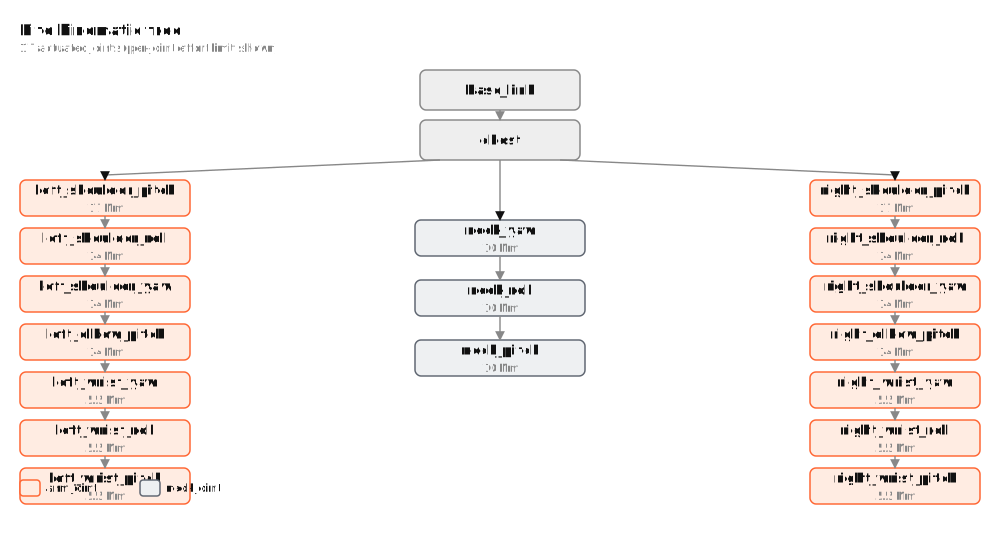
Joint table
Order matches the canonical index used by humanoid_control_lite_controllers.yaml, the
C++ MITState struct, and the Python humanoid_control_policy.ObservationManager. Once a
policy is trained against this order, it is frozen — see "Frozen schemas" in
Architecture.
| Idx | Joint | CAN id | Bus | Model | Direction | Lower (rad) | Upper (rad) | Effort (Nm) | Current (A) | K_p | K_d |
|---|---|---|---|---|---|---|---|---|---|---|---|
| 0 | left_shoulder_pitch | 11 | can0 | rs-02 | −1 | −3.142 | 0.785 | 17.0 | 27 | 50.0 | 2.0 |
| 1 | left_shoulder_roll | 12 | can0 | rs-00 | −1 | −1.571 | 1.920 | 14.0 | 16 | 50.0 | 2.0 |
| 2 | left_shoulder_yaw | 13 | can0 | rs-00 | +1 | −1.571 | 1.571 | 14.0 | 16 | 50.0 | 2.0 |
| 3 | left_elbow_pitch | 14 | can0 | rs-00 | −1 | −2.356 | 0.000 | 14.0 | 16 | 50.0 | 2.0 |
| 4 | left_wrist_yaw | 15 | can0 | rs-05 | +1 | −1.571 | 1.571 | 4.0 | 14 | 50.0 | 2.0 |
| 5 | left_wrist_roll | 16 | can0 | rs-05 | −1 | −0.698 | 0.698 | 4.0 | 14 | 50.0 | 2.0 |
| 6 | left_wrist_pitch | 17 | can0 | rs-05 | −1 | −0.785 | 0.785 | 4.0 | 14 | 50.0 | 2.0 |
| 7 | right_shoulder_pitch | 21 | can1 | rs-02 | +1 | −3.142 | 0.785 | 17.0 | 27 | 50.0 | 2.0 |
| 8 | right_shoulder_roll | 22 | can1 | rs-00 | −1 | −1.920 | 1.571 | 14.0 | 16 | 50.0 | 2.0 |
| 9 | right_shoulder_yaw | 23 | can1 | rs-00 | +1 | −1.571 | 1.571 | 14.0 | 16 | 50.0 | 2.0 |
| 10 | right_elbow_pitch | 24 | can1 | rs-00 | +1 | −2.356 | 0.000 | 14.0 | 16 | 50.0 | 2.0 |
| 11 | right_wrist_yaw | 25 | can1 | rs-05 | +1 | −1.571 | 1.571 | 4.0 | 14 | 50.0 | 2.0 |
| 12 | right_wrist_roll | 26 | can1 | rs-05 | +1 | −0.698 | 0.698 | 4.0 | 14 | 50.0 | 2.0 |
| 13 | right_wrist_pitch | 27 | can1 | rs-05 | −1 | −0.785 | 0.785 | 4.0 | 14 | 50.0 | 2.0 |
(Were the neck wired, indices 14–16 would be neck_yaw, neck_roll,
neck_pitch, all rs-00-class with K_p ≈ 30, K_d ≈ 1.)
Per-joint hardware facts (CAN id, model, direction, torque cap, current cap)
live in the CAD input
robots/lite_dummy/cad/ros2_control.json;
position limits come from the URDF (also from CAD). The generator expands both
into the <param>s of the generated lite_dummy.ros2_control.xacro — each
value appears as a xacro arg on a lite_dummy_joint macro call (don't hand-edit
the generated file):
<xacro:lite_dummy_joint name="left_shoulder_pitch" can_id="11" model="rs-02" direction="-1"
                  lower_limit="-3.141592653589793" upper_limit="0.7853981633974483"
                  torque_limit="17" current_limit="27"
/>
xacro expands those into <param> children on the <joint> element, which
humanoid_devices_robstride/RobstrideSystem::on_init reads (and, for torque_limit /
current_limit, also writes to the actuator firmware at on_activate via
the Robstride parameter IDs 0x700B and 0x7018 — same writes the upstream
T-K-233/Lite-Lowlevel-Python's humanoid_control/control.py performs).
Initial values were mirrored from that repo's configs/bimanual.yaml; if
upstream retunes, edit ros2_control.json and regenerate (see below).
Default stiffness / damping reflects a conservative MIT-mode setting suitable for first activation; tune per deployment.
Retuning torque / current caps
The torque and current limits in the table above are firmware-enforced safety caps — the Robstride controller will refuse commands that exceed them, regardless of what a policy publishes. They're an upper bound, not a target. Lower them when bringing up a new policy on the bench; raise them once the motion envelope is verified.
Edit-rebuild loop — the caps live in the CAD input, so the retune happens in
the lite_description repo and flows back through bar.repos:
-
In the
lite_descriptionrepo, edit the joint'storque_limit(N·m, float) and / orcurrent_limit(A, float) inrobots/lite_dummy/cad/ros2_control.json. -
Regenerate the xacro:
uv run robot-assets-generate lite_dummy --only xacro. -
Commit + push; bump the
lite_descriptionpin inHumanoid Control'sbar.repos(keep the buildfarm's in sync). -
Re-import, rebuild, and re-launch:
cd <workspace>/humanoid_control_ws
pixi shell
pixi run setup        # vcs import — pulls the regenerated lite_description
colcon build --symlink-install --packages-select lite_description
# If a bringup is already running, Ctrl+C it first — the firmware-side
# caps are written on the `on_activate` transition, so an already-
# activated plugin won't pick up the new value until the next bringup.
ros2 launch humanoid_bringup_lite real.launch.py
For a throwaway bench experiment, edit the caps directly in the vcs-imported
src/lite_description/.../lite_dummy.ros2_control.xacroandcolcon build— but that copy is overwritten on the nextpixi run setup, so fold any keeper change back intoros2_control.jsonupstream. -
Confirm in the bringup log that the new value flowed through:
[humanoid_devices_robstride] Wrote torque_limit=15.0 to can_id=11 (left_shoulder_pitch)
[humanoid_devices_robstride] Wrote current_limit=20.0 to can_id=11 (left_shoulder_pitch)
No separate calibration step. Unlike homing_offset (per-physical-robot,
lives in humanoid_bringup_lite/config/calibration.yaml), torque and current
caps are per-robot-tuning — same value on every Lite physical instance,
versioned alongside the URDF. If you want to A/B-test caps across
deployments without editing source, set up two checked-out branches of
Humanoid Control and switch between them rather than splitting the source of
truth.
Setting to 0 disables the firmware write. The plugin treats
torque_limit="0" / current_limit="0" as "skip the parameter write at
on_activate" — useful when the actuator already has the right value
written through some other tool (e.g. robstride_param_set on the bench)
and you don't want this bringup to clobber it.
Robstride actuators store parameter writes in non-volatile memory. If
lite.ros2_control.xacro says torque_limit="17" and the firmware is
later written with 12.0 by a different tool, the next bringup at this
xacro state will overwrite 12.0 back to 17.0 at on_activate. The xacro is
authoritative for what's on the bus, not just what's in this process.
Transports
Lite uses two SocketCAN buses (CAN-to-USB adapters), one per arm. Each
bus is a separate <ros2_control> block in the URDF, each loading its own
humanoid_devices_robstride/RobstrideSystem instance. The default bus names come from
humanoid_bringup_lite/config/lite_hardware.yaml, which the launch passes through
to xacro as the hardware_config:= arg:
| Block | Default ifname | CAN ids |
|---|---|---|
LiteLeftArm | can0 | 11..17 |
LiteRightArm | can1 | 21..27 |

The controller_manager runs both plugin instances concurrently and exposes a single flat 14-joint list to controllers — they don't see the split.
Bus-bring-up checklist
# 1. Bring up both buses at 1 Mbps.
sudo ip link set can0 down 2>/dev/null
sudo ip link set can0 up type can bitrate 1000000
sudo ip link set can1 down 2>/dev/null
sudo ip link set can1 up type can bitrate 1000000

# 2. Read-only sanity scan — no Enable, no MIT.
#    (run from humanoid_control_ws; the `ros2` lines below assume `pixi shell`.)
pixi run scan-bus --iface can0 --scan-to 32
pixi run scan-bus --iface can1 --scan-to 32
# Expect 7 + 7 = 14 actuators replying at ids 11..17 and 21..27.

# 3. Calibrate the zero pose (once per physical robot).
ros2 launch humanoid_bringup_lite calibrate.launch.py
# Hand-sweep every joint to both extremes. Ctrl+C to write calibration.yaml.

# 4. Real-hardware bringup.
ros2 launch humanoid_bringup_lite real.launch.py
If pixi run scan-bus reports ENOBUFS / TX-drop warnings, the actuator
power is off (no ACKs → frames pile up in the kernel qdisc). Power the
motors first.
IMU
A single serial / USB IMU publishes sensor_msgs/Imu on /imu/data. It is
not routed through ros2_control as a SensorInterface — a blocking
serial read inside the controller_manager read() cycle would block the RT
loop. Consumers (RLPolicyController, humanoid_control_policy) cache the latest sample via
realtime_tools::RealtimeBuffer.
Prime humanoid
Bimanual with EtherCAT-driven eRob actuators in the arms and SocketCAN-driven
Sito actuators for auxiliary joints, running concurrently in the same
controller_manager.
The Prime description now lives in the external CAD-generated
prime_description repo — bar
deploys the prime_dummy variant via bar.repos — with the waist dropped
(rigid torso, 14 actuated DoF). humanoid_control_prime_controllers.yaml binds the real
14-joint set (no longer a placeholder). The joint specs below were early
projections; cross-check against prime_description + prime_hardware.yaml.
Projected joint topology
Prime is unique in that two <ros2_control> blocks coexist in its URDF —
one binds ethercat_driver/EthercatDriver, the other binds
humanoid_devices_sito/SitoSystem. The controller_manager runs both concurrently;
controllers see a single flat joint list regardless of which bus carries them.
MIT-mode command convention
Every actuator on both robots (and every sim system) implements a hybrid position-velocity-torque command that is the central abstraction of the project:

Every controller in humanoid_controllers claims all five command interfaces,
even when it only writes some of them (writing zero to the rest is the safe
default — for example ZeroTorqueController writes 0 to everything;
DampingController writes K=0, D=damping_value, q_cmd=captured_q).
The exact same formula is implemented in the Robstride motor firmware, in
mujoco_ros2_control::MujocoSystem (verified in mujoco_system.cpp), and in
any controller we write. As a result a policy that ran on Lite in simulation
runs unchanged against the real Lite — no gain remapping, no quirk shims.
The names stiffness and damping are taken verbatim from
mujoco_ros2_control::MujocoSystem (HW_IF_STIFFNESS = "stiffness",
HW_IF_DAMPING = "damping") so the same controller binds identically against
silicon and sim with no URDF interface-tag rewrites.
Reference & next
- Architecture — how this hardware surface is consumed by ros2_control and the mode FSM.
- humanoid_control_lite_controllers.yaml — the canonical 17-joint binding for every controller.
humanoid_devices_robstride/include/humanoid_devices_robstride/robstride_system.hpp— the SystemInterface implementation for the Lite hardware path.